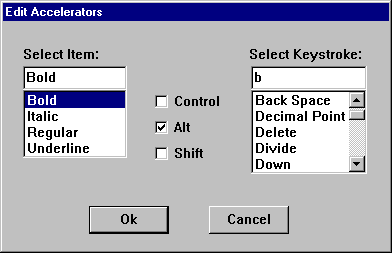
Цей приклад показує, як побудувати діалоговому вікні, що дозволяє користувачеві змінювати корисної можливості, пов'язані з пункту меню. Діалогове вікно складається з поля зі списком, який містить елементи меню, поле зі списком, який містить імена ключі і прапорці для вибору клавіші ctrl, alt і клавіші shift. На рисунку показано діалогове вікно.
Наведений нижче приклад показує, як діалогове вікно визначено у файлі ресурс визначення.
EdAccelBox ДІАЛОГОВОМУ 5, 17, 193, 114 стиль DS_MODALFRAME | WS_POPUP | WS_VISIBLE | WS_CAPTION НАЗВУ "Правка прискорювач" ПОЧАТИ COMBOBOX IDD_MENUITEMS, 10, 22, 52, 53, CBS_SIMPLE | CBS_SORT | WS_VSCROLL |
                        WS_TABSTOP контроль "Контроль", IDD_CNTRL, "кнопку", BS_AUTOCHECKBOX | WS_TABSTOP, 76, 35, 40, 10 КОНТРОЛЮ "Alt", IDD_ALT, "Кнопку", BS_AUTOCHECKBOX | WS_TABSTOP, 76, 48, 40, 10 КОНТРОЛЮ "Shift", IDD_SHIFT, "кнопку", BS_AUTOCHECKBOX | WS_TABSTOP, 76, 61, 40, 10 COMBOBOX IDD_KEYSTROKES, 124, 22, 58, 58, CBS_SIMPLE | CBS_SORT | WS_VSCROLL |
                        WS_TABSTOP PUSHBUTTON "ОК", IDOK, 43, 92, 40, 14 PUSHBUTTON "Скасувати", IDCANCEL, 103, 92, 40, 14 LTEXT "виберіть елемент:", 101, 10, 12, 43, 8 LTEXT "Вибір клавіш:", 102, 123, 12, 60, 8 кінця
Рядок меню програми містить Символ підменю, чиї елементи мають корисні можливості, пов'язані з ними.
МЕНЮ MainMenu {СПЛИВАЮЧИХ "amp;Символ"{MENUITEM" & Regular\tF5», IDM_REGULAR елемент меню "& Bold\tCtrl + B", IDM_BOLD елемент меню "& Italic\tCtrl + I", IDM_ITALIC MENUITEM "& Underline\tCtrl + U", IDM_ULINE}
} ПРИСКОРЮВАЧІ FontAccel {VK_F5, IDM_REGULAR, VIRTKEY "B", IDM_BOLD, керування, VIRTKEY "Я", IDM_ITALIC, керування, VIRTKEY "U", IDM_ULINE, керування, VIRTKEY}
Значення елемента меню для меню шаблон — константи, що визначається таким чином, у файл програми.
# визначити IDM_REGULAR 1100
# визначити IDM_BOLD 1200
# визначити IDM_ITALIC 1300
# визначити IDM_ULINE 1400
Діалогове вікно використовується масив визначений у застосунку VKEY структур, кожна з яких містить клавіш текстовий рядок і на корисну можливість текстовий рядок. Коли створюється діалогового вікна, аналізує масиву і додає кожного натискання клавіші текстового рядка в полі зі списком Виберіть клавіш . Після натиснення кнопки "OK" , діалоговому вікні шукає вибраного клавіш текстовий рядок та отримує відповідну прискорювач текстовий рядок. Діалогове вікно додає прискорювач текстовий рядок тексту пункту меню, що вибрано користувача. Наступний приклад показує масиву VKEY структури:
/ / VKey підстановки підтримки # визначити MAXKEYS 25 typedef типу struct _VKEYS {char * pKeyName;
    Чар * pKeyString;
} VKEYS;

VKEYS vkeys [MAXKEYS] = {"BkSp", "Назад простір", "PgUp", "Page Up", "PgDn", "Page Down", "Кінець", "Кінець", "Будинок", "Дім", "Lft", "Зліва", "Вгору", "Вгору", "Наставника Rgt", "Право", "Dn", "Вниз", "Модулі", "Вставити", "Дель", "Видалити", "Mult", "Множення", "Додати", "Додати", "Південь", "" Відняти "", "DecPt", "Десяткової коми", "Div", "Розділити", "F2", "F2", "F3", "F3", "F5", "F5", "F6", "F6", "F7", "F7", "F8", "F8", "F9", "F9", "F11", "F11", "F12", "F12"}
Процедури ініціалізації діалоговому вікні заповнення Виділіть елемент і Натискання клавіші, виберіть поля зі списком. Після вибору пункту меню та пов'язані прискорювач, діалогове вікно розглядає елементів керування в діалоговому вікні Вибір користувача отримати тексту пункту меню та потім створює нову таблицю прискорювач, який містить користувацький нову корисну можливість. Наступний приклад показує діалогове вікно-процедури. Зверніть увагу, що вам слід ініціалізувати hwndMain ваші вікна процедури.
 // Global variables

HWND hwndMain;      // handle to main window
HACCEL haccel;      // handle to accelerator table

// Dialog-box procedure

BOOL CALLBACK EdAccelProc(HWND hwndDlg, UINT uMsg, WPARAM wParam, LPARAM lParam)
{
    int nCurSel;            // index of list box item
    UINT idItem;            // menu-item identifier
    UINT uItemPos;          // menu-item position
    UINT i, j = 0;          // loop counters
    static UINT cItems;     // count of items in menu
    char szTemp[32];        // temporary buffer
    char szAccelText[32];   // buffer for accelerator text
    char szKeyStroke[16];   // buffer for keystroke text
    static char szItem[32]; // buffer for menu-item text
    HWND hwndCtl;           // handle to control window
    static HMENU hmenu;     // handle to "Character" menu
    PCHAR pch, pch2;        // pointers for string copying
    WORD wVKCode;           // accelerator virtual-key code
    BYTE fAccelFlags;       // fVirt flags for ACCEL structure
    LPACCEL lpaccelNew;     // address of new accelerator table
    HACCEL haccelOld;       // handle to old accelerator table
    int cAccelerators;      // number of accelerators in table
    static BOOL fItemSelected = FALSE; // item selection flag
    static BOOL fKeySelected = FALSE;  // key selection flag

    switch (uMsg)
    {
        case WM_INITDIALOG:

            // Get the handle to the menu-item combo box.

            hwndCtl = GetDlgItem(hwndDlg, IDD_MENUITEMS);

            // Get the handle to the Character submenu and
            // count the number of items it has. In this example,
            // the menu has position 0. You must alter this value
            // if you add additional menus.
            hmenu = GetSubMenu(GetMenu(hwndMain), 0);
            cItems = GetMenuItemCount(hmenu);

            // Get the text of each item, strip out the '&' and
            // the accelerator text, and add the text to the
            // menu-item combo box.

            for (i = 0; i < cItems; i++)
            {
                if (!(GetMenuString(hmenu, i, szTemp,
                        sizeof(szTemp), MF_BYPOSITION)))
                    continue;
                for (pch = szTemp, pch2 = szItem; *pch != '\0'; )
                {
                    if (*pch != '&')
                    {
                        if (*pch == '\t')
                        {
                            *pch = '\0';
                            *pch2 = '\0';
                        }
                        else *pch2++ = *pch++;
                    }
                    else pch++;
                }
                SendMessage(hwndCtl, CB_ADDSTRING, 0,
                    (LONG) (LPSTR) szItem);
            }

            // Now fill the keystroke combo box with the list of
            // keystrokes that will be allowed for accelerators.
            // The list of keystrokes is in the application-defined
            // structure called "vkeys".

            hwndCtl = GetDlgItem(hwndDlg, IDD_KEYSTROKES);
            for (i = 0; i < MAXKEYS; i++)
            {
                SendMessage(hwndCtl, CB_ADDSTRING, 0,
                    (LONG) (LPSTR) vkeys[i].pKeyString);
            }

            return TRUE;

        case WM_COMMAND:
            switch (LOWORD(wParam))
            {
                case IDD_MENUITEMS:

                    // The user must select an item from the combo
                    // box. This flag is checked during IDOK
                    // processing to be sure a selection was made.

                    fItemSelected = TRUE;
                    return 0;

                case IDD_KEYSTROKES:

                    // The user must select an item from the combo
                    // box. This flag is checked during IDOK
                    // processing to be sure a selection was made.

                    fKeySelected = TRUE;

                    return 0;

                case IDOK:

                    // If the user has not selected a menu item
                    // and a keystroke, display a reminder in a
                    // message box.

                    if (!fItemSelected || !fKeySelected)
                    {
                        MessageBox(hwndDlg,
                            "Item or key not selected.", NULL,
                            MB_OK);
                        return 0;
                    }

                    // Determine whether the CTRL, ALT, and SHIFT
                    // keys are selected. Concatenate the
                    // appropriate strings to the accelerator-
                    // text buffer, and set the appropriate
                    // accelerator flags.

                    szAccelText[0] = '\0';
                    hwndCtl = GetDlgItem(hwndDlg, IDD_CNTRL);
                    if (SendMessage(hwndCtl, BM_GETCHECK, 0, 0) == 1)
                    {
                        lstrcat(szAccelText, "Ctl+");
                        fAccelFlags |= FCONTROL;
                    }
                    hwndCtl = GetDlgItem(hwndDlg, IDD_ALT);
                    if (SendMessage(hwndCtl, BM_GETCHECK, 0, 0) == 1)
                    {
                        lstrcat(szAccelText, "Alt+");
                        fAccelFlags |= FALT;
                    }
                    hwndCtl = GetDlgItem(hwndDlg, IDD_SHIFT);
                    if (SendMessage(hwndCtl, BM_GETCHECK, 0, 0) == 1)
                    {
                        lstrcat(szAccelText, "Shft+");
                        fAccelFlags |= FSHIFT;
                    }

                    // Get the selected keystroke, and look up the
                    // accelerator text and the virtual-key code
                    // for the keystroke in the vkeys structure.

                    hwndCtl = GetDlgItem(hwndDlg, IDD_KEYSTROKES);
                    nCurSel = (int) SendMessage(hwndCtl,
                        CB_GETCURSEL, 0, 0);
                    SendMessage(hwndCtl, CB_GETLBTEXT,
                        nCurSel, (LONG) (LPSTR) szKeyStroke);
                    for (i = 0; i < MAXKEYS; i++)
                    {
                        if(lstrcmp(vkeys[i].pKeyString, szKeyStroke)
                            == 0)
                        {
                            lstrcpy(szKeyStroke, vkeys[i].pKeyName);
                            break;
                        }
                    }

                    // Concatenate the keystroke text to the
                    // "Ctl+","Alt+", or "Shft+" string.

                    lstrcat(szAccelText, szKeyStroke);

                    // Determine the position in the menu of the
                    // selected menu item. Menu items in the
                    // "Character" menu have positions 0,2,3, and 4.

                    if (lstrcmp(szItem, "Regular") == 0)
                        uItemPos = 0;
                    else if (lstrcmp(szItem, "Bold") == 0)
                        uItemPos = 2;
                    else if (lstrcmp(szItem, "Italic") == 0)
                        uItemPos = 3;
                    else if (lstrcmp(szItem, "Underline") == 0)
                        uItemPos = 4;

                    // Get the string that corresponds to the
                    // selected item.

                    GetMenuString(hmenu, uItemPos, szItem,
                        sizeof(szItem), MF_BYPOSITION);

                    // Append the new accelerator text to the
                    // menu-item text.

                    for (pch = szItem; *pch != '\t'; pch++);
                        ++pch;

                    for (pch2 = szAccelText; *pch2 != '\0'; pch2++)
                        *pch++ = *pch2;
                    *pch = '\0';

                    // Modify the menu item to reflect the new
                    // accelerator text.

                    idItem = GetMenuItemID(hmenu, uItemPos);
                    ModifyMenu(hmenu, idItem, MF_BYCOMMAND |
                        MF_STRING, idItem, szItem);

                    // Reset the selection flags.

                    fItemSelected = FALSE;
                    fKeySelected = FALSE;

                    // Save the current accelerator table.

                    haccelOld = haccel;

                    // Count the number of entries in the current
                    // table, allocate a buffer for the table, and
                    // then copy the table into the buffer.

                    cAccelerators = CopyAcceleratorTable(
                        haccelOld, NULL, 0);
                    lpaccelNew = (LPACCEL) LocalAlloc(LPTR,
                        cAccelerators * sizeof(ACCEL));

                    if (lpaccelNew != NULL)
                    {
                        CopyAcceleratorTable(haccel, lpaccelNew,
                            cAccelerators);
                    }

                    // Find the accelerator that the user modified
                    // and change its flags and virtual-key code
                    // as appropriate.

                    for (i = 0; (lpaccelNew[i].cmd ==
                                (WORD) idItem)
                            && (i < (UINT) cAccelerators); i++)
                    {
                        lpaccelNew[i].fVirt = fAccelFlags;
                        lpaccelNew[i].key = wVKCode;
                    }

                    // Create the new accelerator table, and
                    // destroy the old one.

                    DestroyAcceleratorTable(haccelOld);
                    haccel = CreateAcceleratorTable(lpaccelNew,
                        cAccelerators);

                    // Destroy the dialog box.

                    EndDialog(hwndDlg, TRUE);
                    return 0;

                case IDCANCEL:
                    EndDialog(hwndDlg, TRUE);
                    return TRUE;

                default:
                    break;
            }
        default:
            break;
    }
    return FALSE;
}